How Your Lactate Zones Match Your Watch’s Zones
This is our most asked question after a test so I have written an article to help.
Step 1: First Things First. Make sure we understand the basics!
What are zones?
Zones are a method we use to try and grade the intensity of exercise.
We train in different zones to target different adaptations and avoid overtraining.
Why do we use heart rate?
Heart Rate is a great measurement as it is direct from your body. lt goes up in a straight line (more or less), depending on the stress your body is under.
You can therefore map your heart rate to zones.
Your Watch's Zones:
Most watches will map your heart rate to zones based on your maximum heart rate, estimated from your age. They will take above:
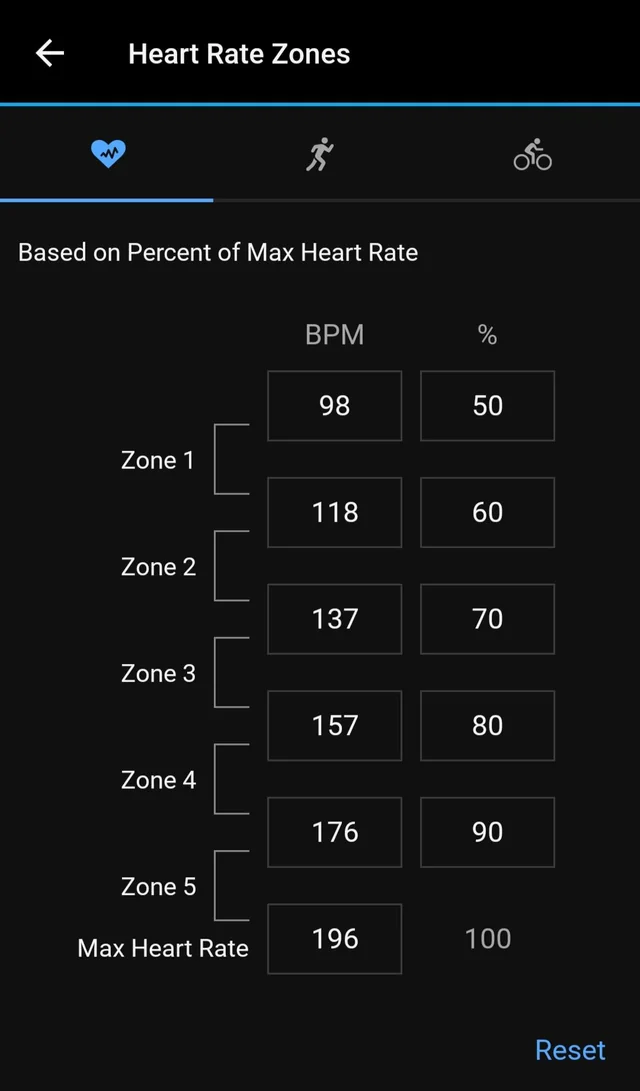
90% of this as zone 5
80% as zone 4
70% as zone 3
60% as zone 2
50% as zone 1
This is an easy system for beginners or those that do not need to track the intensity of their workouts that accurately. Think back to when you first started exercising, it was about just getting it done. For example just completing a 5K regardless of the intensity.
Some watches have different numbers of zones (for example the Coros 6 zone watches) or different zone models. They are usually very similar to the maximum heart rate method above. We have looked at many and here are the main ones! Hover over the other estimation methods below if interested:
(This is similar to the Max HR model but also looks at your resting heart rate and divides zones between the two points)
(This attempts to estimate your heart rate at your anaerobic threshold. They often use a VO2 max estimate based on the fastest paces you have done)
These zones are based on averages from the population, it is impossible for watches to measure your true physiology from your blood, at least for now!
The 3 Zone Truth: Lactate profiling
Our bodies actually have three true zones with two measurable borders between them.
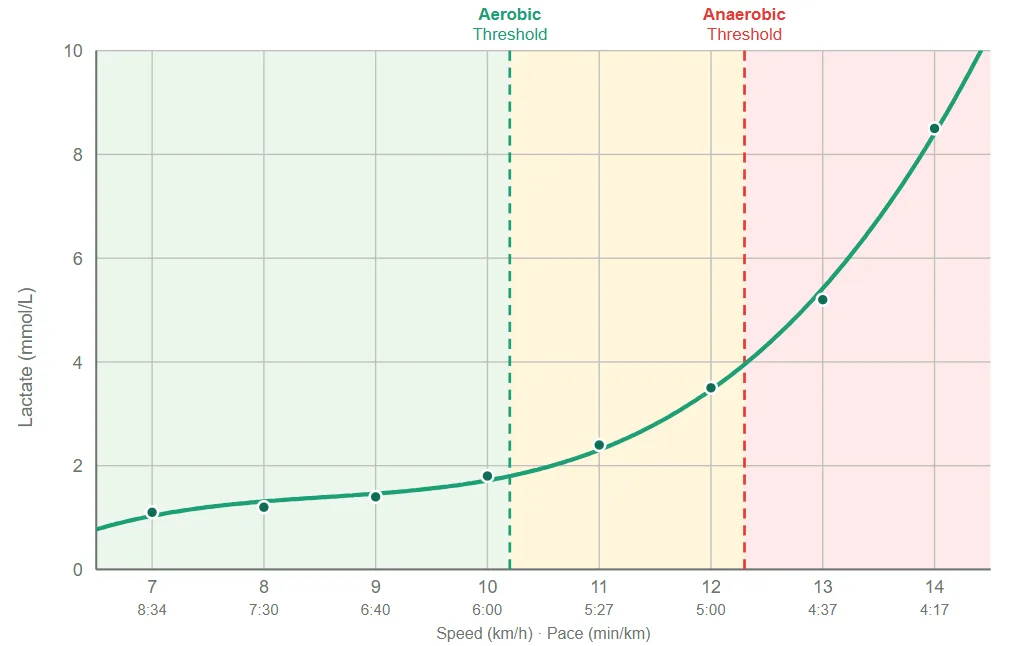
Just like heart rate, lactate is individual and therefore needs careful analysis. Not all lactate curves look the same, not all lactate thresholds are easily found.
(sometimes referred to as LT1) is where lactate starts accumulating. Below it, you clear lactate well and can hold the effort for a long time. This is the true top of an easy effort.
(sometimes referred to as LT2) is where lactate starts accumulating very quickly. Above this point the clock is running on how long you can hold on.
Those two lines create three bands:
- Below your aerobic threshold: easy, sustainable, the aerobic base.
- Between the two thresholds: lactate is climbing, but a semi-steady state is still possible.
- Above your anaerobic threshold: accumulation greatly outruns clearance.
OK that's great but my watch doesn't let me choose 3 zones, what do I do?
The key message I want to get across is to not overcomplicate things. There are 3 true zones so only two numbers (the thresholds) are actually important.
Some watches do allow a 3 zone option but most currently don't.
It's also difficult to keep up with specific instructions for every watch and they update their software all the time. The buttons to press to find the relevant menus keep changing so I can't write specific instructions for each watch, believe me I've tried!
Solution 1:
Just remember 2 numbers. This is what I personally do as I like to keep things simple. I make sure to run my easy runs below 136 (my aerobic threshold) and make sure to hit 167 for intensity (my anaerobic threshold.)
Solution 2:
Some watches allow you to input your LTHR, this will allow you to change your LTHR to your true anaerobic threshold but the rest of the zones won't be accurate. Fine for people who want to make sure they target intensity but run their easy runs very easy, far below the aerobic threshold anyway.
Solution 3
Configure your zones on your watch. Have a look at the image here, this is what most people we test like to do: put the two important numbers in the 5 zone model.
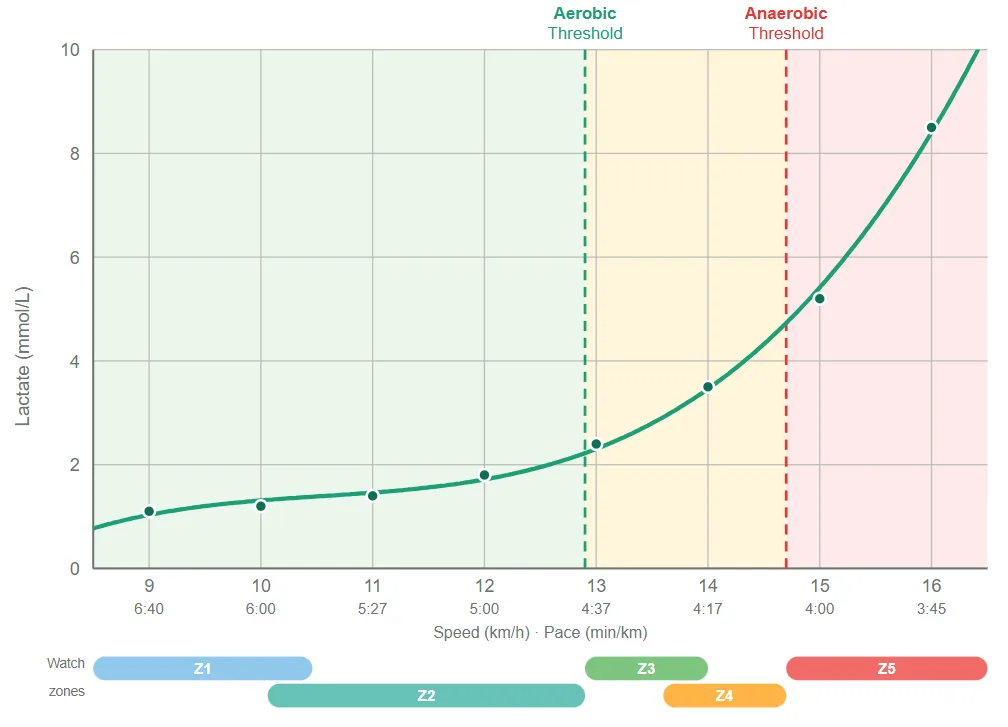
The zone 2/3 border is the aerobic threshold. The zone 4/5 border is the anaerobic threshold.
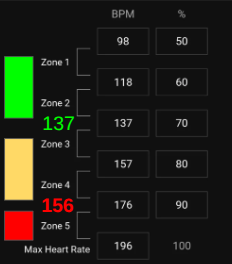
Now you have Zones 1-2 below the aerobic threshold, zones 3-4 in between the thresholds and zone 5 above the anaerobic threshold.
Hopefully at some point the watch companies will allow you to just choose a 3 zone model.
Ready to find your lactate threshold?
Book a test at one of our partner gyms and get a personalised training zone report.
Book a Test